Process Automation Patterns
25th of March 2021Business Processes are the lifeblood of the management discipline known as Business Process Management (BPM), and as such architectural solutions that enable this discipline will be heavily influenced by the practices of the discipline. Similarly, the architectural choices made will influence the discipline as the architecture and its supporting components will put in place a supporting framework for the management discipline with potential capabilities as well as constraints.
As BPM is a management discipline, we will have links with all different levels of architecture. Enterprise architecture will detail and monitor the top process categories (also called business capabilities), business architecture will flesh out the various new processes that will emerge when setting up new value streams, and solution architecture will answer the requirements of automating business processes and optimizing them with the technical components and defining the operational follow-up of these processes.

The success of rolling out a BPM approach within an organization depends in large part on how well the organization can make process improvement part of the DNA of the organization, and their willingness to engage fully in an iterative approach for BPM. The goal is to enter each significant process into a state of continuous improvement. A transition to a process-managed enterprise is complete when it exhibits the following attributes:
- Process improvement is embedded in the business strategy
- Competitive advantage is supported throughout the value chain
- IT practices process-driven budgeting and resource allocation
- Key processes flow seamlessly through the value chain
Any process from the moment it is selected as a viable candidate for a BPM initiative, undergoes a number of states positioned on the Process Lifecycle (as seen on the illustration). These states are:
- Identified - The process has been selected for modeling and automated process management.
- Defined/Refined - The business aspects of the modeled process have been captured, formalized, and refined to a sufficient level to support this iteration of process optimization. On the first iteration through this cycle the identified process selected for automation undergo process discovery and definition; on subsequent iterations the process, having been already defined, is merely refined.
- Designed - The technical aspects of the process model have been addressed including integrations, message handling, interface specification, exception handling, security, transactions, etc. (analytical modeling)
- Composed – The process automation is finalized. All external integrations, message wiring, and security roles have been implemented and/or configured.
- Tested - Any software engineering needed to support the process has completed and has been tested along with the process.
- Deployed - The executable process model, and all external dependencies, have been deployed into a production environment.
- Outsourced – The process has been deemed opportune to be outsourced to a third party. It is defined by Service Level Agreements (SLA), and is followed up by a periodic assessment of whether or not to continue with the outsourcing or to consider the process for refinement again.
- Approved - Final QA approval. All testing and user acceptance procedures have been completed. The model has been released and the chosen automation solution manages the execution of the business process.
- Monitored - Process metrics being are collected and provide actionable business intelligence.
- Disposed – The process no longer has a purpose and all allocated assets are either decommissioned or repurposed.
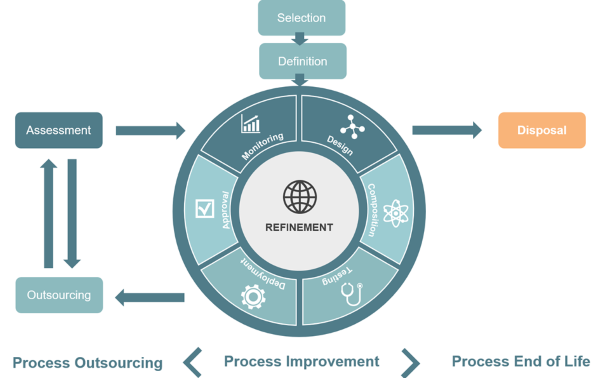
Business Process Lifecycle
In this thought we will focus on the job of the Solution Architect. The architect’s main focus is the refinement step of the lifecycle. Once a process has been selected and defined, the architect needs to determine how to automate this process in order to be able to easily subject to continuous iterations of process improvement. First off, we need to define what the business process is all about. Business Processes in this context can for example either be actual processes where sequencing matters, or they can be cases. The Definition step of the lifecycle did this on a business level, and this will give us insight on what type we are dealing with, and based on this determination there are some considerations that will already become more suited.
Such a distinction was at some point even present at a management discipline level, with on the one hand Business Process Management (BPM) and on the other hand Dynamic or Adaptive Case Management (ACM). Since then, these disciplines have come together, just as the technological possibilities of implementing them have expanded to support both processes and cases. However, doing this initial determination can already help weed out technologies that are not suited if they don’t support the types your organization needs.
This determination is based on the following characteristics: predictability, repeatability, and the nature of the data used. The more predictable or structured a sequence of actions is, or the more repeatable (read this as frequency of the activity structure changing), the more it will be labeled as a process, and if not it is a case. Additionally, a process will be a better fit when working with structured data as opposed to a case that can more easily handle unstructured data. The two extremes of this are processes that never change, which can simply be hardcoded or be bought as part of a COTS solution, and completely unpredictable cases which defy automation, and which will have to be tackled by humans on a case-by-case basis. An overview is shown in the diagram below, which was posited by Jim Sinur, guru in the field of Business Process Management.
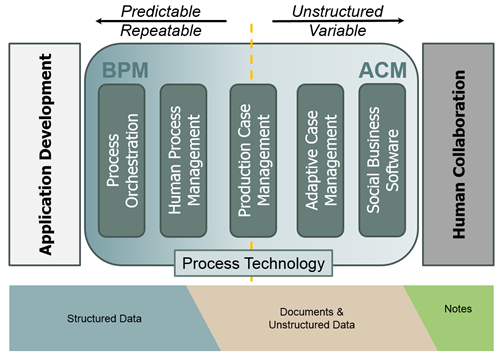
(c) Jim Sinur as seen in "Mastering the Unpredictable"
There are many reasons to automate processes, as it lends certain benefits to the organizations that make the effort. Some of these are specific to the organization automating them, but there are several benefits that are shared by all process automation efforts:
| Objectives | Process Automation Advantages |
|---|---|
| Increased Collaboration | The automated processes communicate and share information, freeing it from controls that are too stringent and objectives that are too narrow. The solution can easily interface within corporate collaboration strategies to enable collaborative expansion. |
| Change Management | It is relatively easy to introduce changes in automated processes. Ideally changes are realized with zero coding - through changing executable forms or models - which are the re-usable assets of these solutions. |
| Intra and Inter Agency Re-Use | The dynamic repository of policies and procedures and the specialization directly supports this requirement and allows business units to share common practices and then specialize for their particular objectives. |
| Cost Savings | The automation can be used to avoid waste, increase process efficiency, and reduce implementation costs:
|
| Increased Employee Efficiency | Process automation reduces human effort, thus freeing employees from labor-intensive repetitive task, and allowing for more time in other duties. These repetitive tasks take up valuable time that can be spent in more value-adding activities. It also reduces the number of human errors that can be made in these types of activities and ensures all activities are executed in the proper order. |
| Regulatory Compliance | The solutions can directly capture and automate all the policies of regulatory compliance in any domain, including financial. The controls for compliance can be automated. In addition, since the solution can keep an audit trail of all the changes, agencies can easily find out the exact policies and procedures executed at a particular point in time. |
| Transparency | Policies and procedures are not “black boxes.” Through the appropriate access controls and secure filtering, stakeholders gain visibility on exactly what is being executed in providing services either internally or to the clientele. Transparency of enterprise operations can be integrated into the solution, with business activity monitoring of executing processes as a well-known option for this. |
| Employee Turnover | Most enterprises have skilled workers who can fall prey to the lure of other employment. The retention of these knowledge workers is a clear and present danger to any organization. Retirement is another such possible knowledge drain. Through process automation and proper discipline, enterprises can harvest the knowledge of these workers and incorporate them into business process solutions. |
| IT Modernization | Process Automation solutions provide an agile business friendly process case management platform to extend, expand, and modernize legacy solutions. This means new policies and procedures are built with the solution, while accessing and leveraging legacy systems of records, via service calls. The extension and integration can be bi-directional. New policies and procedures can similarly be introduced via the solution and be invoked from legacy systems: via service calls. |
There are many different technical possibilities to automate business processes:
- Intelligent Business Process Management Suite (iBPMS): These are solutions that are specifically designed to automate processes using the executable BPMN syntax. All their functionalities are oriented towards this. They focus on the collaboration between different participants in a process, either humans or technological components.
- Robotic Process Automation (RPA): Solutions focused on automating repetitive human tasks, the most recognizable of which are the tasks that boil down to copying data from one platform to another (the so-called swivel chair processes)
- Low Code/No Code Platforms: Sometimes referred to as design BPMS components, these solutions focus on the concept of the citizen developer, where both business and IT people can be responsible for the automation of processes. These solutions tend to focus on processes that consist mostly or even entirely out of human collaborative tasks.
- Service Orchestrations: A set of services that working in concert with each other to provide a process automation. One or more of these services will act as a conductor, stringing all the service calls together to execute the process. The conductor role could also be performed by an integration capability such as an Enterprise Service Bus (ESB), a Hybrid Integration Platform (HIP), or another component with similar functionality.
- Service Choreographies: A set of services that are providing process automation in a more loosely coupled fashion. The interactions between the service calls are either by the executing service calling the next service in line or by publishing a business event that can be captured by other services in the automation.
- Built-in Workflow Solutions: Components that grant the user a large number of predefined automated processes with limited configurability, such as ERP or CRM products. These components focus on processes that are common to all organizations, with no differentiating potential for those organizations, so that standard processes are acceptable to be used.
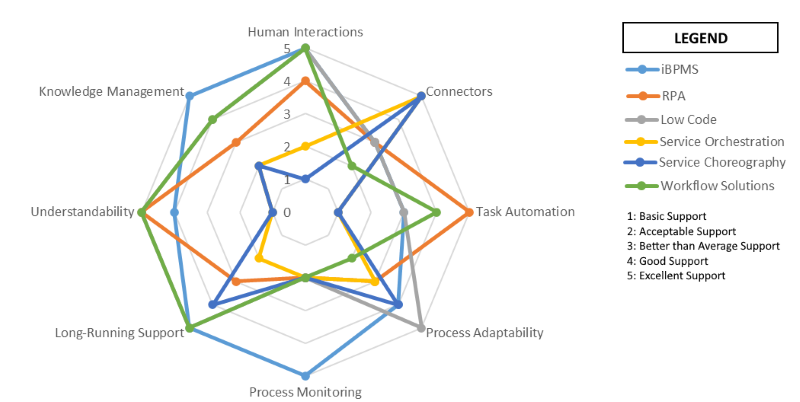
Each of these possibilities distinguishes itself from the other options based on several characteristics:
- Human Interactions: Does the solution allow for human-performed steps to be carried out during the processes?
- Connectors: Does the solution allow for out-of-the-box connectivity to different technologies (services, COTS packages, Internet-of-Things components, other process automation solutions,…)?
- Task Automation: Can the solution replace human necessity for steps of the process?
- Process Adaptability: Does the solution allow for quickly changing the automated process?
- Process Monitoring: Does the solution allow for in-depth monitoring of the process metrics?
- Long-Running Support: Does the solution support long-running processes that persist their current state?
- Understandability: Does the solution offer the means for non-developers to understand the processes it automates?
- Knowledge Management: Does the solution allow for the proper documentation of processes, and the visualization of the necessary steps to be performed?
A consideration that is irrespective of the type of technology you choose to implement process automation is whether to go for a centralized or a decentralized approach. All of the listed technologies can be utilized in both deployment options, but each technology does have a setup where it feels most comfortable, as shown on the graph below. Both deployments have their upsides and downsides, so it does factor into the decision on how to automate your processes. The tradeoff that you make boils down to exchanging the agility you have to modify an existing process (which is easier in decentralized setups) against your ability to proactively monitor and interfere (for example canceling a running order) in a process (which is easier in a centralized setup).
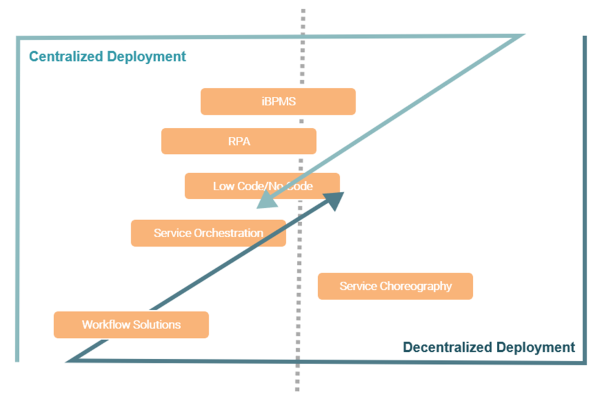
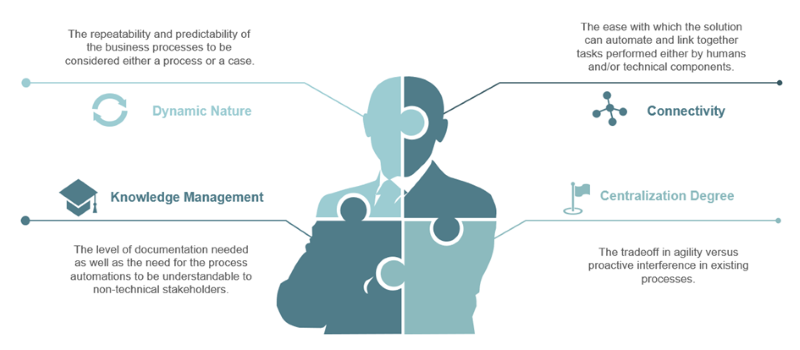
The ultimate choice of which type of automation will be used for any given process thus can be summarized with the differentiating parameters we have spoken about: dynamic nature, connectivity, centralization degree and knowledge management.
| Thought | Business Architecture | BPM | SOA |